Subways
I am a big subway nerd. I have been a paid member of the NYC transit museum for many years, and have even taken subway tours (thanks to my wife) and station tours (also thanks to my wife). I find the subway so fascinating in design, construction, operation, success, and failure. If you live in NYC, chances are, you take a subway at least sometimes. If you're a tourist, there is absolutely no better way to get around.
Like all things, technology is supposed to help. The MTA has an app now, and there are dozens of apps made to help navigate the city. Besides the MTA app, there is an app called CityMapper which has transit information for hundreds of cities around the world, including New York. In my opinion, this app is the only real competition, and the app I would recommend most folks use...for now. There is also Transit and Subway Time, but those have their limitations as well.
Yamtam - Yet Another Mass Transit All-in-One Map
However, I am working on a little project - https://yamtam.nyc. I have a few gripes about CityMapper and I think I have come up with a decent solution to all of them. It covers the whole metro area on one map: subway, LIRR, Metro-North, NJ Transit (rail and bus), PATH, AirTrain JFK, the Roosevelt Island Tram, NYC Ferry, the Staten Island Ferry, MTA and regional buses, Citibike docks, and even free-floating VEO and Lime bikes and scooters.
Yamtam operates right in a mobile browser with no need to install any apps, though you CAN install it to your home screen or app drawer, and when you do it works just like you would expect, only downloading the bits it must. The whole thing weighs about 20MB decompressed: very lightweight html, a single javascript library, some style data, and a massively compressed representation of the state of the entire regional transit system. When I say entire, I mean it. A serverless pipeline collects data from a dozen-plus agencies and sources, rebuilding everything every few minutes. When you have an internet connection, you download a tiny slice of data that represents every line, station, stop, entrance, elevator, escalator, and alert in the system - and that same data keeps working when you're in the tunnels with no internet, which solves my first gripe with CityMapper which gladly tells me I have no internet even though I did have it moments ago.
When you open the app, it does exactly one thing: geolocates me and tells me all about my nearest station. Can I enter my nearest station? Is it closed? Are the trains at that station running? Are the escalators and elevators working? The mere act of opening the app is all you need to do, and you have this data for your closest and every other station in the system.
Since I first wrote about this, it has grown a lot: real-time arrivals everywhere with schedules as a fallback, moving trains drawn right on the track, live elevator and escalator status with outage alerts, every entrance and restroom, per-station service alerts with ♿ pointers to accessible alternatives, live weather, sports scores for the local teams, saved HOME/WORK/favorite places, fuzzy jump-to-station search, and even experimental search-by-destination (type an address and it finds the nearest useful stations with directions). The About page on yamtam.nyc has the full feature list - it ships almost daily, so anything I summarize here is already out of date.
Tour Guide
Built into the map is a curated NYC Tour Guide: self-guided walking tours with time estimates (Lower Manhattan in a day or three, Midtown, Central Park, the Upper East and West Sides, food tours), attraction-by-attraction highlights from Herald Square to the Brooklyn Bridge, and a practical primer on how the street grid actually works, plus current subway fares and how to tap in with your phone. It is in the menu of the map, and there is a printable visitor guide too.
Widgets, Watch, and Menu Bar
Any station's live arrivals can be shown as a stripped-down page - no map, no menus, just countdowns. Each info pane has widget links at the bottom: use them with Glimpse 2 (iOS and Mac menu bar) or Widgetify (Android), or open the link on your Apple Watch. There is also a tappable station picker for small screens:
- Station widget/watch view: https://yamtam.nyc/widget.html
- Station picker: https://yamtam.nyc/wt.html
For example, Forest Hills-71 Av is G08. Enter a URL like this in the widget app:
https://yamtam.nyc/widget.html?stations={"G08":{"E":{"dir":"S","term":"ALL"}}}&settings={"bgcolor":"DDD","fgcolor":"222","title":"E FH To WTC"}
You can customize the colors by changing bgcolor and fgcolor, these are normal web hex colors.
Note the minimum refresh is 15 minutes on iOS and 5 minutes on Android, so not perfectly real-time.
CLI tool published to PyPI
For those of you who prefer the CLI, I published a small tool to PyPI (pip install yamtam). It mirrors the map's arrivals logic in your shell and allows you to do things like this: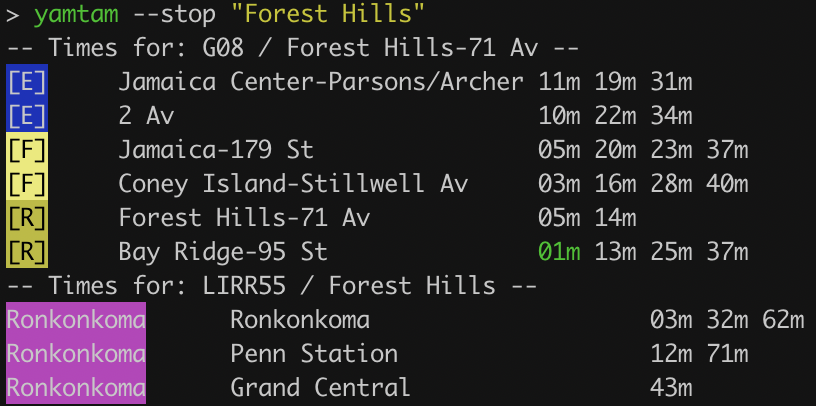
Upgrades will come over time, but it works well for what it does.
For developers
Every data file the site uses is served publicly as open JSON and GeoJSON, so you can build your own things on the same live data the map runs on - no API key, no rate games.
Trying it out
The map is free and works offline once loaded; it carries a small number of ads to pay for the feeds and CDN, and there is a Ko-Fi if you would rather skip them with a good feeling. Bugs, wrong arrivals, and feature ideas all go to shawn@yamtam.nyc - every message gets a real reply, and many of the map's best features started as someone's email. Just getting a .nyc domain required a little extra validation - you can only get one if you live in the five boroughs, so you get a little extra validation that I am not only the creator, but I'm also a customer!